
什么是 HTML?
HTML 是用来描述网页的一种语言。
HTML 指的是超文本标记语言 (Hyper Text Markup Language) HTML 不是一种编程语言,而是一种标记语言 (markup language) 标记语言是一套标记标签 (markup tag) HTML 使用标记标签来描述网页
HTML 标签
HTML 标记标签通常被称为 HTML 标签 (HTML tag)。
HTML 标签是由尖括号包围的关键词,比如 <html> HTML 标签通常是成对出现的,比如 <b> 和 </b> 标签对中的第一个标签是开始标签,第二个标签是结束标签 开始和结束标签也被称为开放标签和闭合标签
HTML5 语义元素
什么是语义元素? 语义元素清楚地向浏览器和开发者描述其意义。
非语义元素的例子:<div> 和 <span> - 无法提供关于其内容的信息。
语义元素的例子:<form>、<table> 以及 <img> - 清晰地定义其内容。
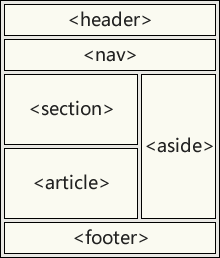
<main> 元素
HTML <main> 元素呈现了文档的 <body> 或应用的主体部分。主体部分由与文档直接相关,或者扩展于文档的中心主题、应用的主要功能部分的内容组成。
<header>Gecko facts</header>

<main>
    <p>Geckos are a group of usually small, usually nocturnal lizards. They are found on every continent except Australia.</p>

    <p>Many species of gecko have adhesive toe pads which enable them to climb walls and even windows.</p>
</main>
<header> 元素
<header> 元素为文档或节规定页眉。
<header> 元素应该被用作介绍性内容的容器。
一个文档中可以有多个 <header> 元素。
下例为一篇文章定义了页眉:
<article>
   <header>
     <h1>What Does WWF Do?</h1>
     <p>WWF's mission:</p>
   </header>
   <p>WWF's mission is to stop the degradation of our planet's natural environment,
  and build a future in which humans live in harmony with nature.</p>
</article>
<nav> 元素
<nav> 元素定义导航链接集合。
<nav> 元素旨在定义大型的导航链接块。不过,并非文档中所有链接都应该位于 <nav> 元素中!
实例
<nav>
<a href="/html/">HTML</a> |
<a href="/css/">CSS</a> |
<a href="/js/">JavaScript</a> |
<a href="/jquery/">jQuery</a>
</nav>
<section> 元素
<section> 元素定义文档中的节。
根据 W3C 的 HTML 文献:“节(section)是有主题的内容组,通常具有标题”。
可以将网站首页划分为简介、内容、联系信息等节。
<section>
   <h1>WWF</h1>
   <p>The World Wide Fund for Nature (WWF) is....</p>
</section>
<section>
   <h1>Introduction</h1>
   <p>The World Wide Fund for Nature (WWF) is....</p>
</section>
<article> 元素
<article> 元素规定独立的自包含内容。
文档有其自身的意义,并且可以独立于网站其他内容进行阅读。
<article> 元素的应用场景:
论坛
博客
新闻
html<article class="forecast"> <h1>Weather forecast for Seattle</h1> <article class="day-forecast"> <h2>03 March 2022</h2> <p>Rain.</p> </article> <article class="day-forecast"> <h2>04 March 2022</h2> <p>Periods of rain.</p> </article> <article class="day-forecast"> <h2>05 March 2022</h2> <p>Heavy rain.</p> </article> </article>
<aside> 元素
<aside> 元素页面主内容之外的某些内容(比如侧栏)。
aside 内容应该与周围内容相关。
<p>My family and I visited The Epcot center this summer.</p>

<aside>
   <h4>Epcot Center</h4>
   <p>The Epcot Center is a theme park in Disney World, Florida.</p>
</aside>
<figure> 和 <figcaption> 元素
在书籍和报纸中,与图片搭配的标题很常见。
标题(caption)的作用是为图片添加可见的解释。
通过 HTML5,图片和标题能够被组合在 <figure> 元素中:
<figure>
   <img src="pic_mountain.jpg" alt="The Pulpit Rock" width="304" height="228">
   <figcaption>Fig1. - The Pulpit Pock, Norway.</figcaption>
</figure>
HTML5 中的语义元素
| 标签 | 描述 |
|---|---|
| <article> | 定义文章。 |
| <aside> | 定义页面内容以外的内容。 |
| <details> | 定义用户能够查看或隐藏的额外细节。 |
| <figcaption> | 定义 <figure> 元素的标题。 |
| <figure> | 规定自包含内容,比如图示、图表、照片、代码清单等。 |
| <footer> | 定义文档或节的页脚。 |
| <header> | 规定文档或节的页眉。 |
| <main> | 规定文档的主内容。 |
| <mark> | 定义重要的或强调的文本。 |
| <nav> | 定义导航链接。 |
| <section> | 定义文档中的节。 |
| <summary> | 定义 <details> 元素的可见标题。 |
| <time> | 定义日期/时间。 |